
In this section
Whole-property Wi-Fi
Rooms, verandahs and the yard you actually use.
Wireless building links
Internet to the shed without digging a trench.
Point-to-point
A radio link between two buildings that can see each other.
Multi-building
House, shed, stable and gate on one plan.
Network cabinets
A labelled cabinet instead of a pile of gear.
Equestrian
Stables and yards that need the same network as the house.
After the dish is on
Starlink brings the internet into one building. To spread it around the property we use Wi-Fi access points and wireless links, usually TP-Link Omada gear. We are not TP-Link. For some houses a shop-bought mesh kit is enough, and we'll tell you if so.
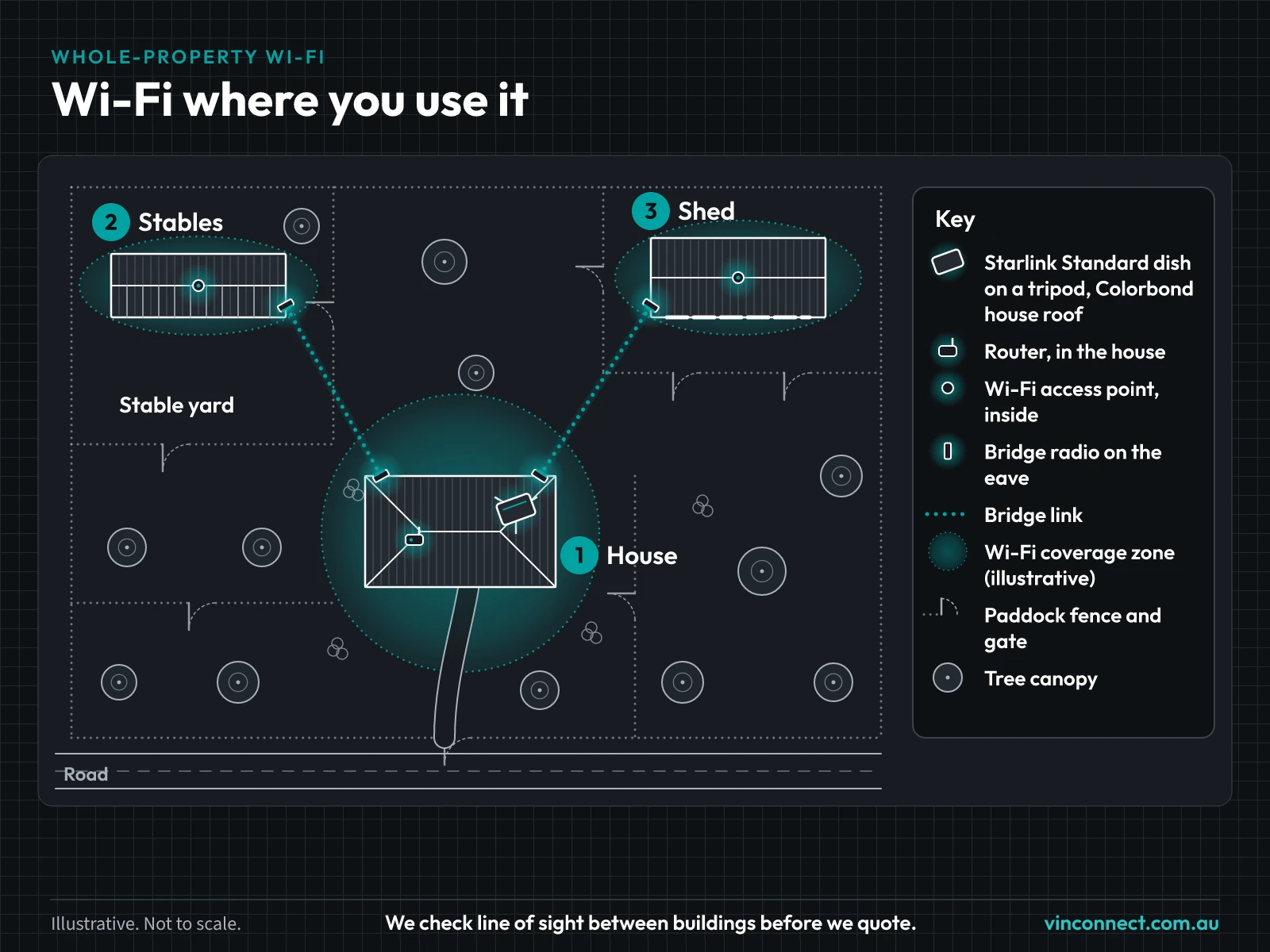
Mark the buildings first
Mark your buildings on the property planner before you buy anything. We use the distances to work out what gear you need.
Questions
- Can this be staged?
- Yes. Dish first, house Wi-Fi second, and the shed link when you're ready.